代写操作系统作业,使用 Multithreading
开发程序,并发实现飞机场调度问题。
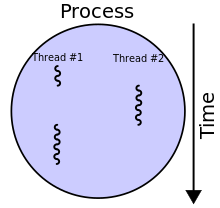
Introduction
Running the simulator sequentially takes a long time. By creating a
multithreaded version that runs all the airports in parallel, is much more
efficient.
The purpose of this assignment is
- Give you experience writing multithreaded applications.
- Give you experience using locks.
- Give you experience using conditional variables.
- To further improve your programming skills.
In this assignment you will transform the serial version of the air
transportation simulator into a multithreaded version.
System Requirements
This assignment is intended to be done and executed in a Unix environment. You
can use the Unix server, a Mac (in Terminal), or your own Unix-based system,
such as Linux, OpenBSD, FreeBSD, etc. This may also work in the Cygwin
environment under Windows. Note: Your code will be tested.
Background
This assignment assumes the same functionality as Assignment 2. In fact, the
test cases are identical. The challenge is to make things multithreaded.
You will need to use the pthread library for Assignment 3. Note: if you are
planning to do this assignment in Java, please speak to the instructor because
you will need to use Java’s threading system instead of pthread.
The goal of this assignment is to maximize the concurrency. A major part of
the grade will be based on the amount of concurrency in your solution. To
maximize concurrency it is recommended that each airport be simulated on its
own thread. I.e., once all the flights are read in and scheduled, a thread
should be created for each airport, and then each airport simulates each
minute of the day independently. Once all threads complete there simulation,
the main thread can print out the results of the simulation. That is, when
your program runs it should
- Read in and schedule all flights, like in Assignment 2.
- Create and one thread per airport. (Use pthread_create())
- Wait for all threads to complete. (Use pthread_join())
- Print the output, like in Assignment 2.
Each airport thread should perform the same main loop, like in Assignment 2.
For each minute of the day: - Perform one step of the simulation for the airport associated with the thread
- If a flight completes, add it to the list of flights to be printed.
- Synchronize with all airports by performing a barrier.
All airports must remain in sync. Meaning that one airport’s clock cannot run
faster than another’s. I.e., if one airport simulates one hour, at the same
time as another airport simulates five minutes, the schedule will be
corrupted. Consequently, at the end of each iteration, each airport thread
must ensure all other airport threads have also finished their iteration. This
synchronization is called a barrier. The pseudocode for a barrier looks like
shared int waiting = 0
barrier():
waiting++
if waiting < num_threads:
suspend()
else:
waiting = 0
resume_all()
—|—
Naturally, you will need to protect the shared variable as well as
suspend/resume the threads.
You will find functions such as
- pthread_mutex_lock()
- pthread_mutex_unlock()
- pthread_cond_wait()
- pthread_cond_broadcast() or pthread_cond_signal()
You will also need to create and initialize mutex locks and condition
variables.
Lastly, there are shared data structures in the simulator such as the queues,
the list of flights to be printed, and the free list (in the sample solution
implementation of priority queues). If you are using your own implementation
as a starting point, there may be other shared data structures as well. You
will need to protect these data structures while maximizing concurrency, so
each queue and each shared list should have its own mutex locks.
Using the pthread library (or Java threads) transform the airport simulator
into a multithreaded version. You can either extend your own version, which
you submitted for Assignment 2, or the provided Assignment 2 solution.
Simulator Input
The input is the same as Assignment 2. Please see examples as shown in the
provided test suite (tests_2.zip).
##Processing and Semantics
All processing rules are the same as in Assignment 2. Hint: for simplicity, it
is recommended that the full day be simulated instead of stopping when all
flights are done.
Expected Output
The output is the same as Assignment 2. Please see examples as shown in the
provided test suite (tests_2.zip).
Nonfunctional Requirements
Same nonfunctional requirements as Assignment 2. Note: the starting code is
either your solution to Assignment 2 or the sample solution, found on
Brightspace.
Test Your Code!
To test your code, a test suite (tests_2.zip) is provided. Same test
procedures as those in Assignment 2 are recommended.
Hints and Suggestions
- The recommended decomposition is to create a thread for each airport.
- Remember to protect the shared data structures with mutex locks.
- The sample solution to Assignment 3 only required 100 lines of additional code added to atsim. and pqeue.c. (The sample solution did not require any modifications to airport.c.
The Java Option
Same conditions apply as in Assignment 2. A penalty of 10% will be applied if
the assignment is done in Java instead of C. Please speak to the instructor to
get help with using threads in Java.
Grading Scheme
The assignment will be graded on four criteria:
Concurrency
“Is the solution maximally concurrent?”. This is determined by inspecting the
code and ensuring for appropriate use of threads and locks. Concurrency is
used as a multiplier for the rest of the code. Concurrency is graded on a 4
point scale:
- (4) Solution is maximally concurrent e.g., uses threads appropriately and uses individual locks for each instance of a data structures.
- (3) Solution is mostly concurrent e.g., uses threads appropriately but uses a single lock for all instances of a data structure.
- (2) Solution is somewhat concurrent e.g., does not use threads appropriately or uses a single lock for all data structures.
- (1) Solution is not very concurrent e.g., does not use threads appropriately and uses a single lock for all data structures.
- (0) Solution is not concurrent.
The concurrency factor is multiplied by Functionality score because the base
solution passes all tests.
Functionality
“Does it work according to specifications?”. This is determined in an
automated fashion by running your program on a number of inputs and ensuring
that the outputs match the expected outputs. The score is determined based on
the number of tests that your program passes. So, if your program passes Tt
tests, you will receive that proportion of the marks.
Quality of Solution
“Is it a good solution?” This considers whether the solution is correct,
efficient, covers boundary conditions, does not have any obvious bugs, etc.
This is determined by visual inspection of the code. Initially full marks are
given to each solution and marks are deducted based on faults found in the
solution.
Code Clarity
“Is it well written?” This considers whether the solution is properly
formatted, well documented, and follows coding style guidelines.
If your program does not compile, it is considered non-functional and of
extremely poor quality, meaning you will receive 0 for the solution.
What to Hand In
You need only submit an electronic of your assignment. Submission must be done
by 11:59 AM of the due date. Submission is done via Brightspace.
The assignment submission should be a single zip file (.zip) comprising the
source code files that implement the simulator as well as the makefile and the
runme.sh file.
Programming Guidelines
- The program must read the input from the console (stdin) and must print out the results to the console (stdout) unless otherwise specified. Do not print out any output or request any input other than what is specified by the assignment.
- Use the file and function names specified in the assignment.
- Your programs will be compiled and tested on the Unix server. In order to receive credit, your programs must compile and run on this server.
- Your program must compile. Programs that do not compile will receive a 0.
- The programs must be well commented, properly indented, and clearly written. Please see the style guidelines under Assignments or Resources on the course website.